iCash
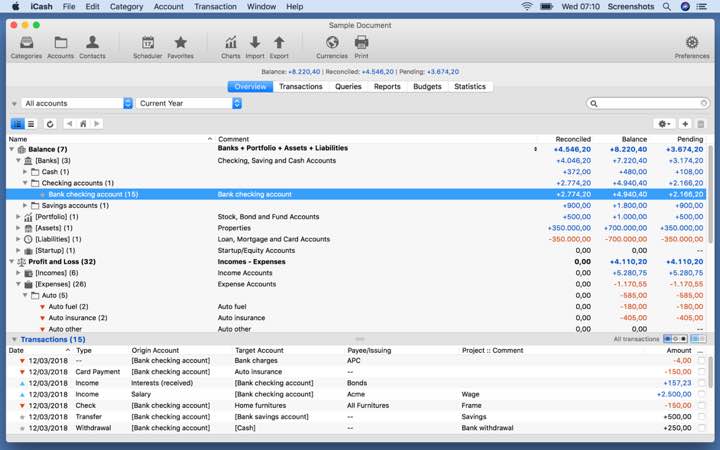
iCash는 수입, 지출, 신용, 부채, 은행 거래 등을 추적하여 개인 재정을 관리하는 데 도움을 주기 위한 소프트웨어입니다.
- Intel, 64-bit processor
- macOS 10.14 or later
소개
iCash is intended to help you control your personal finances, keeping track of incomes, expenses, credits, debts, and bank transactions for you. As simple as creating the accounts you need and moving money between them! You don’t even need to know about accounting or even care about it! Your finances depend largely on good organization that lets you know where your money comes from and where it goes.
WHAT’S NEW
Version 7.9.0:
• Deductible expenses report.
• Category statement report.
• SQL engine has been updated to enhance stability, speed, and file security.
• Cryptocurrencies support. You can now have accounts with the currency set to a cryptocurrency (386 supported).
• It is possible to update cryptocurrency rates automatically through the internet like regular currencies.
• It is now possible to set a custom range in the statistics window by selecting a starting and ending year.
• New 24-month, 36-month, 2-year, and 3-year intervals added to the overview P&L pull-down menu.
• Double-click on the bank account in the browser to open the account edition panel.
• You can now select a previous comment from a list when editing a transaction group comment (aka ‘Split’).
• A new advanced preference entry allows for adding transactions with a duplicate tracking number.
• Creating a tax report for a given project is now possible.
• You can now enter/overwrite the transaction tracking number by clicking on the ‘Tracking #’ label.
• The Statistics panel now supports projects. It is now possible to get statistics for a given project.
• The Chart windows now support projects, so it is possible to create a chart for a given project.
• When duplicating a group, the date is set to the month and year as with single transactions.
• The tracking number field number has been moved to the top right of the entry panel.
• The transaction entry panel ‘Project’ field now displays the projects ordered by date in descending order.
• In the transaction entry panel, Control-Cli





스크린샷