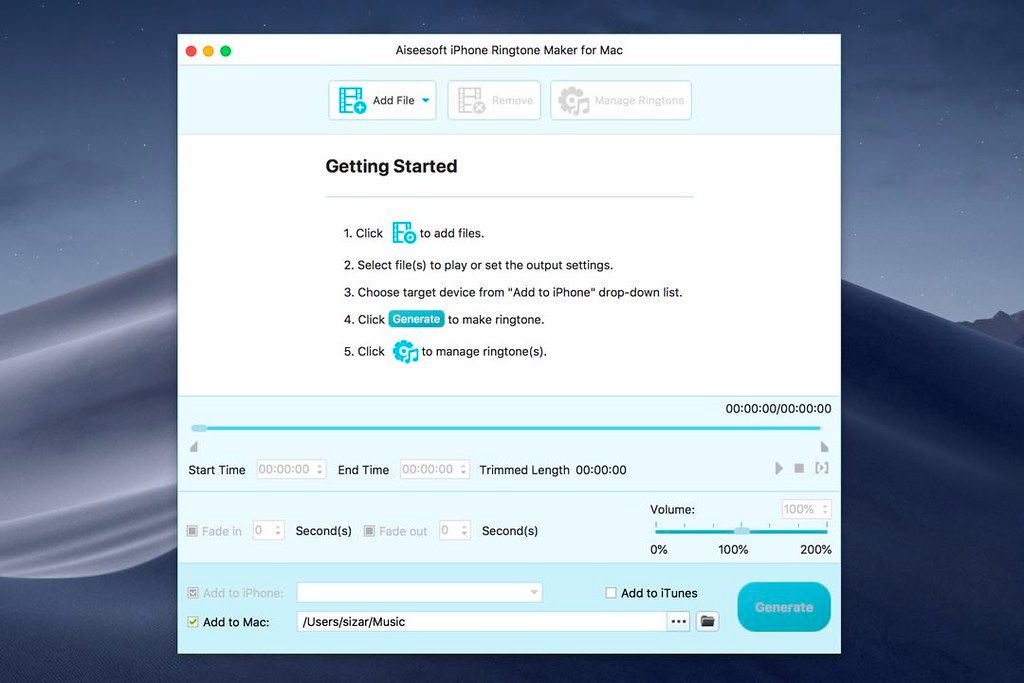
Aiseesoft iPhone Ringtone Maker
Aiseesoft iPhone Ringtone Maker for Mac - Convert any video and audio to iPhone ringtone M4R format and upload M4R files to iPhone, iTunes and Mac.As the ...
소개
Aiseesoft iPhone Ringtone Maker for Mac – Convert any video and audio to iPhone ringtone M4R format and upload M4R files to iPhone, iTunes and Mac.
As the professional Mac iPhone ringtone creator and manager for Mac users, this software can convert almost all the video and audio formats to iPhone ringtone M4R and upload directly to your iPhone as the ringtone.
Convert Video/Music to iPhone Ringtone on Mac
Mac iPhone Ringtone Maker provides a good solution to convert any video and music to iPhone ringtone M4R format on your Mac.
Customize iPhone Ringtone on Mac
You are able to get your favorite music clips as iPhone ringtones. At the same time, you can add fade-in and fade-out effect of your ringtone.
Transfer M4R Ringtone Files Conveniently
After creating the iPhone ringtone, you are able to save the M4R ringtone on your Mac. Further, you can easily transfer the ringtone to iPhone and iTunes.
Create Your Own iPhone Ringtone on Mac
How to get ringtones on iPhone? iPhone Ringtone Maker for Mac lets you convert any audio file from your CD album or iTunes, including MP3, WMA, AAC, WAV, OGG, M4A, RA, RAM, AC3, MP2, etc. to M4R file as the iPhone ringtone.
It can also extract free audio from favorite movies or paticular animated movie with catchy tones in AVI, MPEG, WMV, MP4, FLV, MKV, H.264/MPEG-4, DivX, XviD, MOV, RM, RMVB, M4V, VOB, ASF, 3GP, 3G2, H.264, QT, MPV, etc. and create it to M4R audio format as the ringtone.
Customize and Manage iPhone Ringtone on Mac
As the actual Mac iPhone ringtone converter, this software can set the exact or casual time for you to get the music clips. To have a better enjoyment, you can add fade-in and fade-out effect to the output iPhone ringtone. According to your preference, you can manage your added ringtone from your iPhone, iPad and iPod easily on your Macbook, including removing the iPhone ringtone and renaming the ringtone.
Designed with User-friendly Features
Before converting the audio/video file to ringtone, this






스크린샷