TunesGo Retro
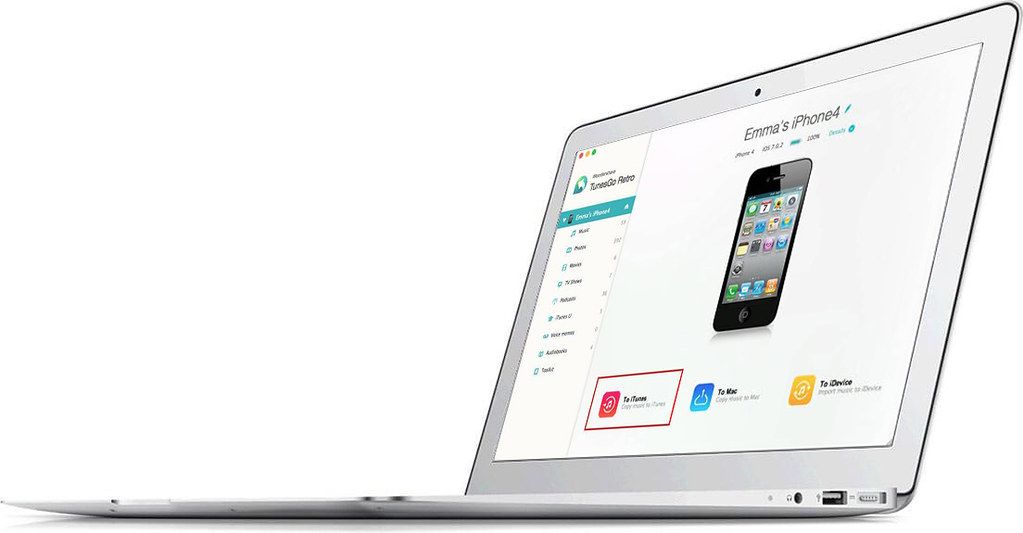
TunesGo Retro gives you the freedom to transfer music and playlists from your iPhone, iPad and iPod to your iTunes Library on your Mac. You...
Description
TunesGo Retro (was TunesGo) gives you the freedom to transfer music and playlists from your iPhone, iPad and iPod to your iTunes Library on your Mac. You can’t depend on iTunes to rebuild your iTunes Library or backup music, videos, photos, voice memos, etc. to your Mac. It simply can’t do it. Instead, you need a transfer software tool like TunesGo Retro.
It’s a professional iPhone/iPod/iPad manager for Mac.
It not only does what iTunes can do: transfer music, videos and photos to iPhone/iPod/iPad, but also does what iTunes can’t do: let you copy iPhone/iPod/iPad music and playlists (smart playlists included) to your iTunes Library with ratings, play counts and skips or backup videos, photos, voice memos, Podcasts and more to your Mac.
Now, you’ll no longer worry about issues when managing your songs, photos, and video.
Export Music and Playlists from iPod/iPhone/iPad to iTunes with Ratings and Play Counts
Whether you’ve bought a new Mac computer or lost music from your iTunes Library, now with Wondershare TunesGo Retro (Mac), you can export all music and playlists on your iPhone, iPad and iPod touch/classic/shuffle/nano to your iTunes Library on Mac with ratings, play counts and skips.
What’s more, this feature never duplicates any song or playlist you’ve had on iTunes Library. That means it only exports songs and playlists you don’t already have on your iTunes Library from iPhone, iPad, iPod touch/nano/shuffle/classic to your iTunes Library.
Transfer Music, Videos, and Photos on iPhone, iPod, and iPad to Mac
Want to backup some songs and videos on iPhone, iPod touch, or iPad to your Mac’s hard drive? Or have you taken so many photos with your iPhone, you need to copy them on Mac for further editing? With Wondershare TunesGo Retro (Mac), simply select the music, videos, or photos on iPhone, iPod touch and iPad that you want and click “Export to Mac” to transfer them to iMac, MacBook Pro, or MacBook Air.
Convert and Transfer Songs and Videos on Mac to Play o




Screenshots