Trimma
Trimma is the easiest way of quickly cutting videos without any hassle. No project creation like in iMovie, no strange export settings...
- Intel, 64-bit processor
- macOS 10.14.6 or later
Description
Trimma is the easiest way of quickly cutting videos without any hassle. No project creation like in iMovie, no strange export settings that change the video’s resolution.
Just follow these simple steps :
1. Open the video
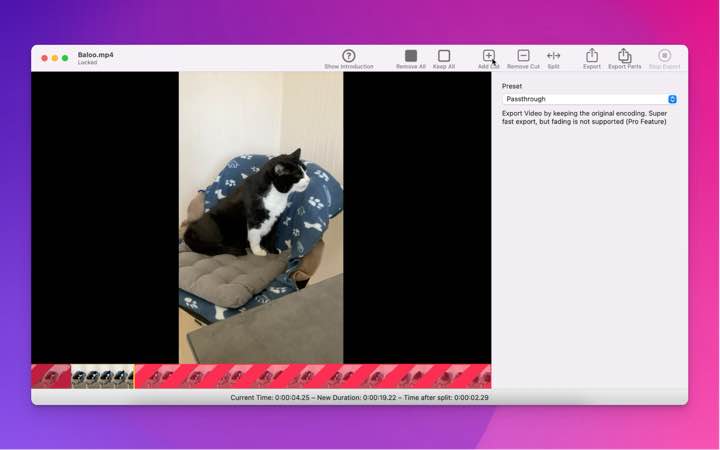
2. Insert cuts to quickly remove unwanted parts
• quickly scroll through your video or use the cursor keys for precision steps
• use the toolbar buttons or the hotkeys A / S to quickly add / remove cuts.
• insert a cut in the red area will end the red area at the current position
3. Choose an export preset
• Passthrough – keep the original encoding, small files stay small, export is blazing fast
• HEVC – The High Efficiency Video Codec uses the power of h265 encoding to video to a tiny file. Great for sharing with other Mac / iOS Users!
• AVC – The Advanced Video Codec uses the power of h264 and also creates small video files. Files are not as small as with HEVC, but compatibility with older systems is better
• Thumbnail – The only free preset. It generates a small video with low quality. Fast in export and gives an idea of what to expect from the export.
4. Export – yeah, it’s really not more complicated
WHAT’S NEW
Version 2.2.2064:
• Release notes were unavailable when this listing was updated.
REQUIREMENTS
• Intel, 64-bit processor
• macOS 10.14.6 or later
ScreenShots
If you are using Adblocker!! Please support this website by adding us to your whitelist. Ads are what helps us bring you premium content! Or read this to know how you can support us. Thank you!
•
Size
– 4MB
Previous Versions
Editor-checked details
Recommended when the job is simply removing heads, tails or dead sections while preferring the source encoding. Use: duplicate source; record MediaInfo/hash; mark cuts; Thumbnail proof; try Passthrough; inspect keyframe boundaries, A/V sync and HDR; fall back to H.264/H.265; play fully in QuickTime and target devices; retain source, output, cut manifest and SHA-256. Choose H.264 for widest compatibility and trial H.265 for smaller Apple-ecosystem delivery, subject to the delivery specification. Compare Final Cut Pro, DaVinci Resolve or Premiere Pro for multitrack work, QuickTime Player for built-in simple trim and FFmpeg for free scripted batch processing. Never operate on the sole source.
Pros
- Its strength is a short workflow: open one medium, mark keep/remove ranges, choose encoding and export without building a large editing project. Passthrough avoids re-encoding when container/codec and boundaries permit, making export fast with no generational loss or accidental resolution change. H.264 offers broad device compatibility; H.265 generally saves space at comparable quality. Thumbnail quickly proofs the keep/remove logic. Cursor keys and A/S suit precise review of short material. It is faster to start than a full NLE for trimming heads/tails, removing dead sections, cleaning screen recordings or rough-cutting camera clips before upload.
Cons
- It is not a multitrack NLE and lacks complex transitions, subtitle tracks, grading, denoise, speed curves, multicam, mixing and project media management. Passthrough does not guarantee lossless cuts at arbitrary frames: long-GOP boundaries can move to keyframes, so inspect the output. H.264/H.265 transcoding takes time and loses quality; wrong presets can lose HDR, metadata or compatible audio. This older channel build targets Intel and relies on Rosetta compatibility on Apple silicon, with uncertain future OS support. Its exact changelog is unavailable, so test real formats. Without a rich project timeline, record cut decisions separately for repeatability.
Installation steps
- The listed 2.2.2064 package requires 64-bit Intel and macOS 10.14.6+; validate it through Rosetta 2 on Apple silicon. Copy the source and record container, video/audio codecs, resolution, frame rate, colour/HDR, duration and hash. On a short copy test keep/remove segments, frame stepping, A/S cuts and full export. Passthrough avoids re-encoding, making it fast and generation-loss-free, but cut accuracy/container compatibility can depend on source keyframes. Choose AVC/H.264 or HEVC/H.265 when exact boundaries or transcoding are required. Export to a new folder, never overwrite the sole original, and proof in QuickTime plus the target device.
Uninstallation steps
- Before removal, archive sources, Trimma outputs, cut-point notes and presets; keep passthrough, H.264/H.265 delivery files and a low-bitrate review copy when important. Record container, codecs, audio tracks, resolution, frame rate, colour, HDR and duration with a media inspector; create SHA-256 and a manifest. Proof the opening, every join, A/V sync, final frame and metadata on target players. Confirm purchase/unlock recovery and back up needed preferences before deleting the app. Trimma has no rich project file that replaces sources, and an export cannot restore discarded segments.
Common errors and fixes
- If passthrough cuts drift or start badly, remember lossless remuxing is often constrained by keyframes/GOP; transcode to H.264/H.265 or move the boundary to a decodable keyframe. If QuickTime rejects an export, use a common AVC/H.264 MP4/MOV combination, inspect audio codec and re-export rather than renaming the extension. For A/V drift inspect variable frame rate, timestamps and source damage; normalise a copy to constant frame rate first. Use H.264 for older devices. For washed-out HDR verify primaries, transfer, matrix and metadata; do not transcode important HDR with an unknown preset. Unsupported containers/codecs may fail in system frameworks. Work with large files on fast local storage, maintain free output space and verify duration/file size after every export.
What changed in this version
- The listed build is 2.2.2064. No complete itemised notes are public for this exact build, so newer audio, CLI and other current-site capabilities are not backported into its description. Confirmed channel/basic workflow covers timeline keep/remove ranges, adding/removing cuts, cursor-key stepping, A/S shortcuts, Passthrough, HEVC/H.265, AVC/H.264 and low-quality Thumbnail preview. Treat 2.2.2064 as a maintenance build; compare the same source before/after upgrade for boundaries, duration, A/V sync, resolution, codec and QuickTime playback.






Screenshots