Spirit City: Lofi Sessions
Spirit City: Lofi Sessions is a gamified focus tool, set to a soothing lofi soundtrack. Discover and collect Spirits, customize your...
- Intel, 64-bit processor
- macOS 13.0 or later
Description
Spirit City: Lofi Sessions is a gamified focus tool, set to a soothing lofi soundtrack.
Discover and collect Spirits, customize your cozy virtual space, and facilitate your real-life tasks with a collection of handy features designed to improve concentration and ease stress.
CHILL LOFI BEATS AND SOUNDS
Soft, soothing lofi music and dynamic soundscapes such as pattering rain and crackling fire provide the perfect background ambiance to relieve stress and unwind. All music in game is courtesy of Homework Radio and fully stream-friendly, perfect for featuring on youtube or twitch as a pleasing background.
SHOW OFF YOUR STYLE
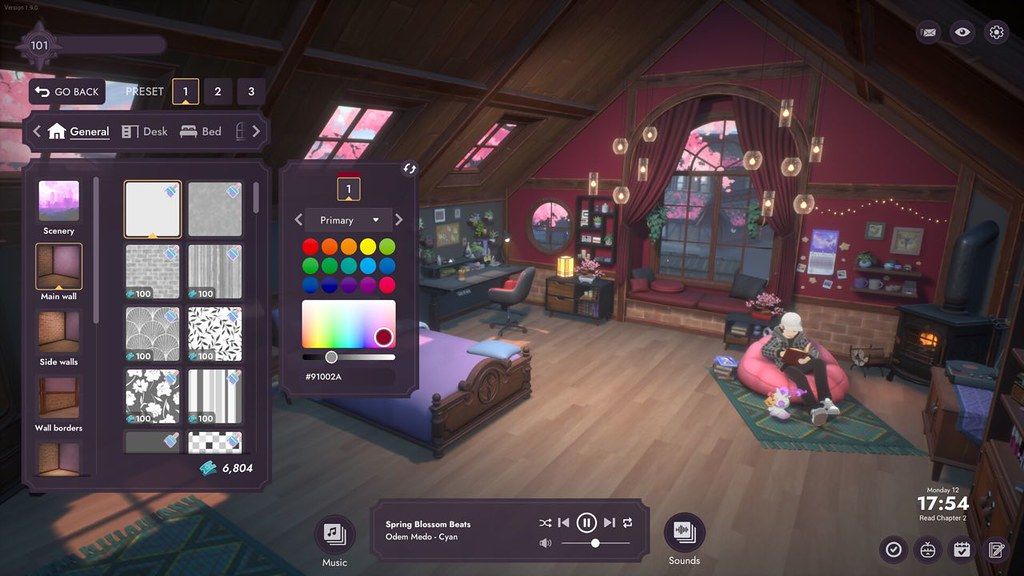
Customize both your character and your bedroom to suit your mood, selecting from a multitude of fashion, hairstyle, color, and room decor options. From hoodies to horns, bookshelves to boba teas, fairy lights to fireplaces, there’s dozens of options available for you to flex your unique personality and style.
ADORABLE SPIRIT COMPANIONS
Explore different combinations of room activities, soundscapes, and decor options to lure out the mischievous Spirits that populate the world. Discover and collect them as you focus on your tasks. You’ll never be alone with a Spirit companion by your side. And yes, every Spirit can be petted too!
BEGIN YOUR PRODUCTIVITY JOURNEY
Utilize built-in productivity tools, including a to-do list for organization, a timer for focused work sessions, and a habit tracker and journal to foster a healthy routine. Earn XP for practicing good habits, unlocking more goodies over time – from new character & room cosmetics, to hints to help discover more Spirits, being productive has never been so rewarding!
KEY FEATURES
• Listen along to a carefully curated catalog of chill lofi beats, with a selection of themed playlists for every mood and occasion;
• Stay organized using integrated productivity tools, including a to-do list, session timer, habit tracker and journal;
• Create your own avatar. Choose from a variety of ha
Editor-checked details
Recommended for study, writing or office routines supported by music, soundscapes and light collecting, without team project management. Run a 15-minute test: create task, set reminder, start timer, check a habit, write a short journal entry, quit/reload; then inspect Pocky, Lofi Girl, transparent UI and controller. M1+, macOS 14 and 8 GB are hard minimums; M2/macOS 15 is better for persistent use. Do not install 2.4.1 on Intel. Safe order: dual backup; SHA-256; validate productivity data on a copy; confirm cloud sync; restore main profile. Compare Session for pure timers/statistics or Structured for task planning.
Pros
- It combines tasks, focus timers, reminders, habits and journal in one calm virtual room, reducing app switching. Lofi music mixes with rain, fire and other soundscapes, and the official catalogue is stream-friendly. Avatar, room and Spirit collecting turn routines into gentle rewards without punitive pressure. The Lofi Girl collaboration is distinctive, while 2.4.1 improves Apple-silicon performance and controller reminders. English, Simplified Chinese, Japanese and Korean interfaces are official; Steam Cloud aids continuity.
Cons
- It is a gamified focus companion rather than a full project manager: complex dependencies, teamwork and advanced analytics are limited. A persistent 3D room uses more RAM, GPU and battery than a text timer. Music/decor unlocks require continued use and some themes are paid DLC. The engine upgrade can download nearly the full install and removes Intel support from 2.4.1; Intel users remain on an older branch. Transparent UI and non-English display still warrant checking. Traditional Chinese is not an official interface language; this editorial translation does not imply in-game support.
Installation steps
- This page covers Spirit City: Lofi Sessions 2.4.1. Its engine upgrade changes the official Mac minimum to macOS 14 Sonoma, Apple M1, 8 GB RAM and 6 GB storage; the recommendation is macOS 15, M2 and 8 GB. Intel is unsupported. Reserve 12 GB of temporary space. Back up Steam Cloud and local to-do lists, timers/reminders, habits, journal, favourite tracks, Spiritdex, avatar and room layouts, then record 2.4.1/SHA-256. Launch with copied data and test the Lofi Girl scene, Pocky, transparent UI, music/soundscapes, tasks, reminders, controller, save and reload. Restore main data only after confirming stable performance.
Uninstallation steps
- Before uninstalling, finish the focus timer, let tasks, habits and journal save, then wait for Steam Cloud. Export or capture critical task/reminder text and separately back up local data, Spiritdex, avatar, room, favourites and the 2.4.1/SHA-256 record. Remove caches only when needed; do not delete the save container at the same time. On reinstall, confirm M1+ and macOS 14+, compare local/cloud timestamps and prevent an empty profile overwrite. Validate reload with one test task, short timer, habit and journal entry before restoring long-term records.
Common errors and fixes
- For launch failure or poor performance, confirm M1/M2/M3/M4 and macOS 14+. Intel cannot run this branch; the official “macos” Steam beta preserves an older build but does not receive 2.4.1 content. For broken transparent UI, disable overlays, switch window mode and restart; this followed the engine rendering change. If non-English text is missing, verify 2.4.1 and language settings. For silent reminders, check macOS notifications, Focus mode and auto-dismiss; reset Steam Input for controllers. Preserve a playlist copy before music troubleshooting. On cloud conflict, go offline and retain both sides so an empty productivity profile cannot overwrite complete records.
What changed in this version
- Official hotfix 2.4.1 addresses the Apple-silicon performance regression after the 2.4.0 engine upgrade; future Intel Mac updates are paused because the new rendering backend no longer fits that architecture. It fixes Pocky discovery clipping at the desk, missing localized text, Lofi Girl ponytail physics, a desk-wall decor icon mismatch, and foot clipping with socks/boots. Timer tools gain automatic reminder dismissal and reminder pop-ups accept controller input. Channel foundations from 2.4.0 include Lofi Girl, Pocky, Lyon background, themed outfits/room items, bay-window guitar activity and custom daily reminders.
File verification






Screenshots