Resident Evil Village
Experience survival horror like never before in the 8th major installment in the Resident Evil franchise - Resident Evil Village...
Description
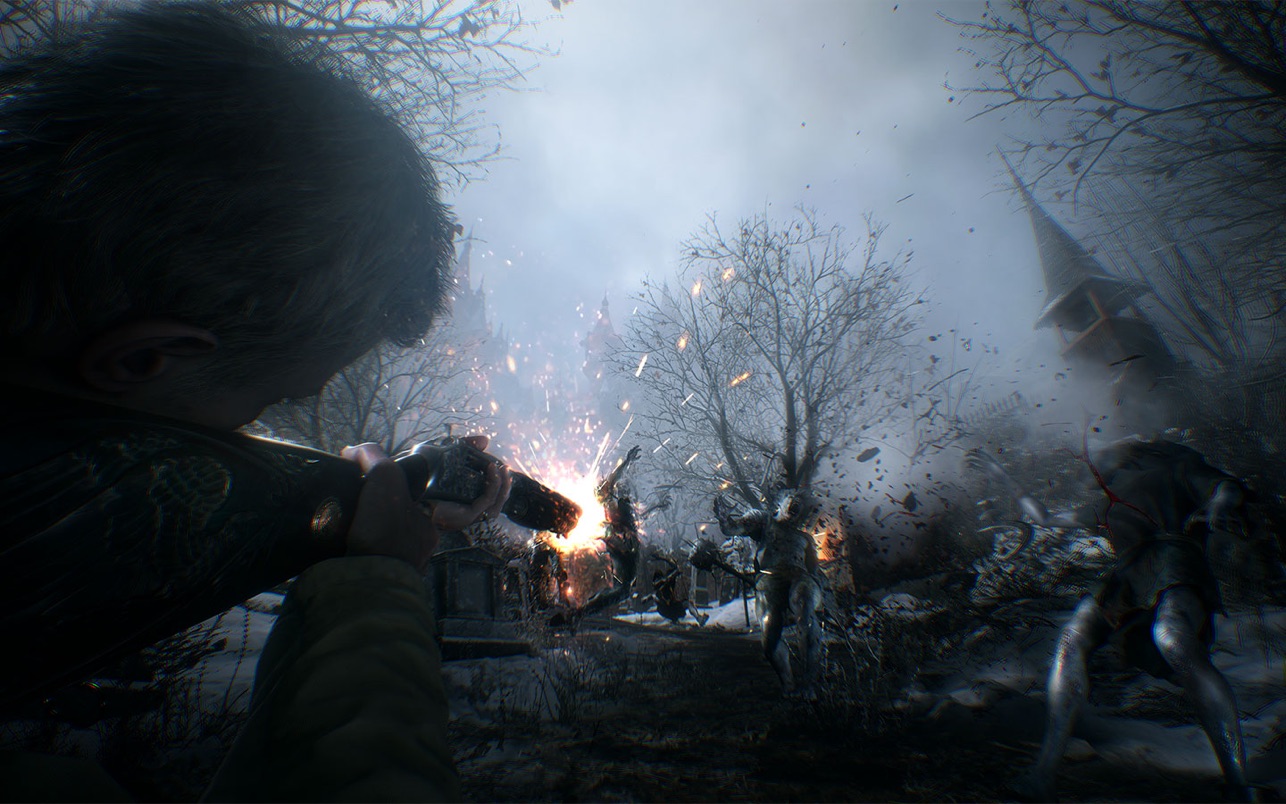
Experience survival horror like never before in the 8th major installment in the Resident Evil franchise – Resident Evil Village . With detailed graphics, intense first-person action and masterful storytelling, the terror has never felt more realistic.
Included Content
• Resident Evil Village
• The Trauma Pack DLC
• Samurai Edge – AW Model-01
• Resident Evil 7 Found Footage Filter
• Resident Evil 7 Tape Recorder Save Point
• Saferoom Music “Go Tell Aunt Rhody”
• Mr. Everywhere Weapon Charm
• Unlock “Village of Shadows” Difficulty
• The Tragedy of Ethan Winters Artwork
• The Baker Incident Report
• Survival Resources Pack
• Mr. Raccoon Weapon Charm
WHAT’S NEW
Version 1.1.2:
Added the ability to upload and download saved data via iCloud Drive
• Save data cannot be uploaded and downloaded between MacOS and iOS devices.
The ‘Brightness’ setting is now only available when HDR Mode is set to ‘Off’.
When HDR Mode is set to ‘On’, please use your display’s built-in settings to adjust brightness.
REQUIREMENTS
• Mac with Apple M1 chip or later.
• macOS 12.0 or later
ScreenShots
If you are using Adblocker!! Please support this website by adding us to your whitelist. Ads are what helps us bring you premium content! Or read this to know how you can support us. Thank you!
Size
– 34.72GB
Previous Versions
Editor-checked details
Recommended for Apple-silicon players who want narrative survival horror and a focused solo campaign. Base M1 should target medium quality and stable frame time; higher resolutions favour Pro/Max chips with more memory/GPU headroom. Back up saves; verify 1.1.2, entitlements and SHA-256; finish the prologue at defaults; test keyboard/mouse and controller; verify save reload and sleep; raise graphics one item at a time; buy expansions only if their modes are wanted. Compare Resident Evil 4 for third-person remake action, Alien: Isolation for science-fiction horror, or Death Stranding Director’s Cut for action and large environments, after checking each Apple-silicon/system requirement.
Pros
- RE Engine delivers detailed environments, lighting and characters on Apple silicon, with tightly paced first-person exploration, resource management, puzzles and combat. Village and castle spaces are distinctive, the main story is self-contained and save points are clear. It supports keyboard/mouse plus compatible PlayStation, Xbox and MFi controllers, with English, Simplified/Traditional Chinese, Japanese, Korean and other languages. The base campaign stands alone, while Winters’ Expansion adds third-person mode, Mercenaries Additional Orders and Shadows of Rose.
Cons
- Intel Macs are entirely unsupported, and the 34-GB store size still needs patch/cache headroom. Base M1 systems may face memory and thermal limits at high resolution and texture settings. First-person motion, jump scares, violence and oppressive horror will not suit everyone; the age rating is 18+. Expansions and some extras require separate purchases, so the base app is not the complete DLC set. Version 1.1.2 lacks the later iCloud upload/download capability and needs manual local backup before migration or reinstall. HDR, input and display-mode issues must be diagnosed within this build rather than inferred from later behaviour.
Installation steps
- This page is pinned to Resident Evil Village for Mac 1.1.2. Official minimums are Apple M1 or later and macOS 12.0+; Intel Macs are unsupported. The store lists about 34 GB, so keep at least 55 GB free for download, extraction, saves and cache. Back up existing saves and record 1.1.2, base-game/DLC entitlements and installer SHA-256. Start at defaults and test keyboard/mouse or controller, cutscenes, aiming, save points, reload, sleep recovery and audio during the prologue. Base M1 systems should begin with medium textures, lower resolution and a stable frame target, raising one setting at a time. Winters’ Expansion, outfits and the All Access Voucher are separate purchases. Version 1.1.2 does not contain the later iCloud upload/download feature, so later release notes must not be applied to this build.
Uninstallation steps
- Quit and confirm a save-point write has finished. Copy manual saves, autosaves, settings and crash logs, labelled with chapter, difficulty, 1.1.2, DLC state and SHA-256. Reload the copy offline and pass another save point. Do not treat macOS and iOS saves as interchangeable, and do not delete the only local copy based on a later iCloud feature. For diagnosis, rename settings/cache folders rather than deleting saves. Removing the app does not revoke purchases, DLC or Game Center achievements. Retain the 1.1.2 source and at least two rotating save generations until a reinstall passes chapter, combat and save verification.
Common errors and fixes
- For install or launch failure, confirm Apple silicon, macOS 12+, space and SHA-256, restart and disable recording/overlays; compatibility mode cannot support Intel. If keyboard/mouse stops after a cutscene, reconnect devices, switch window/fullscreen and cross-check with a supported controller while retaining logs. For low FPS or heat, reduce resolution, textures, shadows and image quality, connect power and disable Low Power Mode. For HDR brightness problems, reproduce first in SDR/default and do not attribute later HDR-setting behaviour to 1.1.2. A missing save-upload option is expected: iCloud upload/download belongs to a later build, so 1.1.2 needs rotating local backups. For missing DLC, verify purchase account, restore purchases and region before overwriting a dependent save.
What changed in this version
- Resident Evil Village for Mac 1.1.2 was released on 2023-10-30. Apple’s official history lists a single change: the app name was changed. The keyboard/mouse response fix belongs to the earlier 1.1.1, while iCloud Drive save upload/download and HDR brightness-setting changes belong to a later release. This page therefore attributes only the name change to 1.1.2 and preserves those boundaries for troubleshooting.
File verification






Alternatives

Screenshots