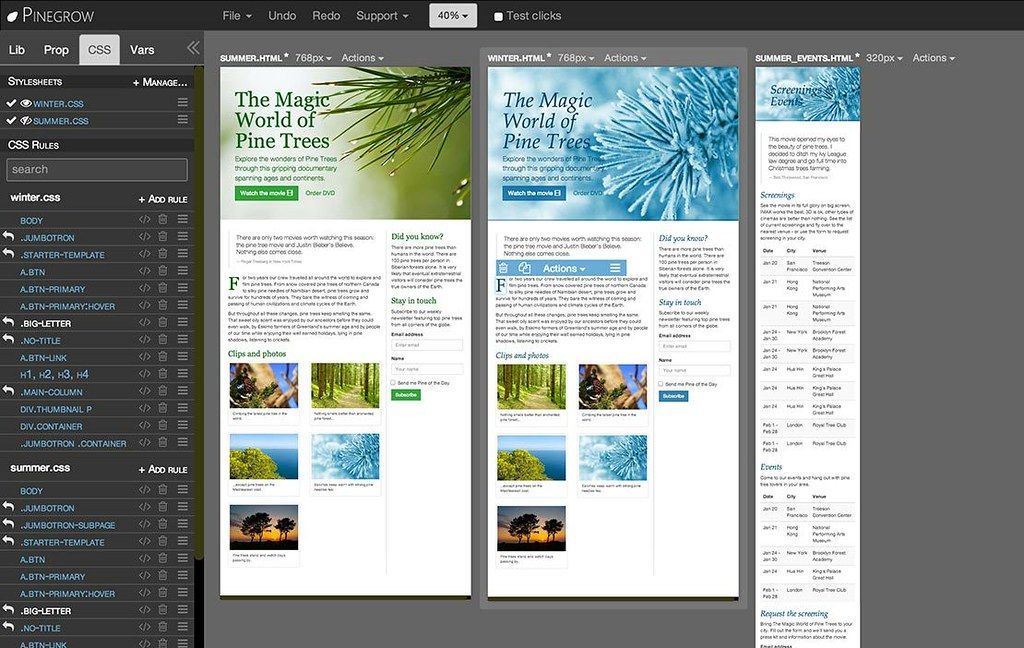
Pinegrow Web Designer
Pinegrow Web Designer 2.3 - is desktop app that lets you mockup and design webpages faster with multi-page editing, CSS and LESS styling, and smart...
Description
Pinegrow Web Designer is desktop app that lets you mockup and design webpages faster with multi-page editing, CSS and LESS styling, and smart components for Bootstrap, Foundation, Angular JS, and WordPress.
WHAT’S NEW
Version 2.3:
• Editing code – With Pinegrow you can either edit the HTML code of the whole page or the code of the selected element. Both editors incorrectly reported syntax errors and had problems keeping up with your super-fast ten-fingers typing. This has now been fixed and improved.
Personally, I’m still not happy with code editing in Pinegrow and plan to rewrite that part in the upcoming releases. Using an external code editor alongside Pinegrow is the best way to work around any code editing issues.
You can use your favorite code editor or IDE to edit HTML and CSS source files and when you save the changes, Pinegrow will auto-refresh the page.
• Exporting WordPress themes in trial mode – Exporting theme created with File -> New page didn’t do anything. That was not our intention and it has been fixed. Now you’ll be able to export the theme. Please note that saving the source HTML files in trial mode is disabled. You’ll get a fresh 7 days trial period with this release. This means that you can finally play around with Blocks for WordPress themes.
• Other WordPress builder bug fixes
• require_once paths for Bootstrap navigation menu walker are now correct on all platforms.
• Body class action works again.
• Paths of theme source files can now include .html in folder names (that one was silly).
• Smart WordPress navigation menus – What’s the part of WordPress theme creation process dreaded by most developers? Getting navigation menus to work! Specifically, getting WordPress to output the menus in a way that conforms with menu layout of your framework or web builder tool.
For Bootstrap we solved this problem a while ago by adding a Menu type = Bootstrap property to the Navigation menu action. But what about other frameworks or your custom menu lay






Screenshots