Party Club
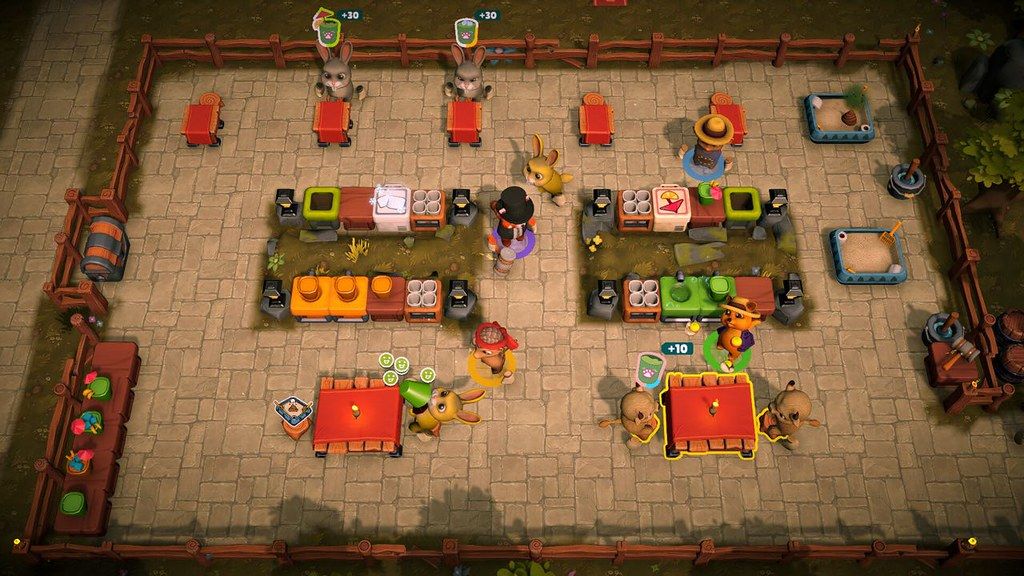
Seat customers, serve drinks, and manage chaos with up to 4 players! Keep the peace by considering customer types while...
- Intel, 64-bit processor
- macOS 10.13 or later
Description
Seat customers, serve drinks, and manage chaos with up to 4 players! Keep the peace by considering customer types while seating them. Survive disasters, handle quirky customers, and design the perfect venue to keep the party going!
PLAY WITH FRIENDS!
Play solo or with up to 4 friends in couch mode or online co-op mode, and turn your venue into the hottest spot in the region.
SEAT AND SERVE
Greet customers at the door, choose their seats, and manage their satisfaction. If someone’s too much to handle, you can always give them the boot—literally!
BE AWARE OF CUSTOMER TYPES
Your customers are animals with unique personalities and seating preferences. Be careful—seating a panda next to a tiger might not end well!
You better watch out for special customers, while some may involuntarily release gas and knock you out, others may try to knock you out with old methods.
ORGANIZE YOUR VENUE
Set up tables, juice machines, and even toilets wherever you like! Make purchases at the end of each day and strategize your layout to handle the flow of customers and challenges.
PROVE YOURSELF TO MASTER MIXOLOGISTS
Experience the challenges of different regions and prove yourself to the master mixologists of those lands.
BUT MOST IMPORTANTLY DON’T FORGET TO HAVE FUN!
WHAT’S NEW
Version 1.7.31:
• Release notes are available here .
REQUIREMENTS
• Intel, 64-bit processor
• macOS 10.13 or later
ScreenShots
If you are using Adblocker!! Please support this website by adding us to your whitelist. Ads are what helps us bring you premium content! Or read this to know how you can support us. Thank you!
•
Size
– 1.91GB
Previous Versions
Editor-checked details
Recommended for an established group of two to four that enjoys short cooperative shifts, emergent comedy, customer compatibility and traffic layout. For the first session assign greeting/seating, drinks, delivery/cleanup, with a fourth player floating for special customers. Spend first on wider paths and the recurring bottleneck rather than extra machines. Solo players should learn animal compatibility in an easier region. Use the official floor—Big Sur, Metal, 4 GB RAM and 6 GB—not the older 10.13 text; four-player online benefits from 8 GB and stable wired/Wi-Fi. Safe order: dual backup; 1.7.31/SHA-256; one solo day; two controllers; private lobby; main save.
Pros
- It adds seating compatibility and venue design to Overcooked-like task division: players serve drinks while deciding which animal customers can sit together and how toilets/machines shape traffic. Solo, couch and online co-op support up to four players. End-day furniture purchases alter the next run rather than repeating one kitchen. Special customers, disasters and regional challenges reward live communication, while cute animal presentation keeps it approachable. Cloud, achievements and stats support continued play; Simplified/Traditional Chinese, Japanese and Korean have official interface/subtitles.
Cons
- Co-op depends heavily on communication: unclear roles make several players chase one task while nobody greets or cleans. Seating conflicts, special customers and disasters can turn control into chaos, adding pressure for players seeking relaxed management. Solo requires constant task switching and cannot reproduce four-person specialization. Online play needs broadband and matching builds; latency affects carrying, serving and ejection timing. Keyboard works, but gamepads are recommended and couch play needs enough compatible controllers. Official minimums are now Big Sur, M1 or 2016+ Intel, Metal and 6 GB, making the older 10.13 listing too broad.
Installation steps
- This page covers Party Club 1.7.31. Official Mac minimums are macOS Big Sur, any M1 or an Intel Mac from 2016 onward, 4 GB RAM, a Metal-capable GPU, broadband and 6 GB storage; Monterey, M1 Pro, 8 GB RAM and a recent dedicated GPU with 4 GB VRAM are recommended. The site’s older macOS 10.13 text is not used as compatibility evidence. Back up Steam Cloud, region progress, venue layouts, purchases, characters and controls, then record 1.7.31/SHA-256. Start solo and complete greeting, seating, drinks, cleanup and end-of-day buying, then connect a second gamepad for couch co-op. Online players should confirm an identical build.
Uninstallation steps
- Before uninstalling, finish the day and return to the region menu; do not quit during scoring or co-op sync. Separately back up cloud progress, layouts, unlocked regions/decor, character appearance, keyboard/gamepad mappings, lobby preferences and 1.7.31/SHA-256; note each player’s input device. Do not clear user data with the app. After reinstalling, load a solo copy and verify customer types, seating compatibility, machines, toilets, purchases and end-day results, then test two-gamepad couch play. Finally create a private online lobby, invite players one at a time and confirm progress ownership before replacing the main save.
Common errors and fixes
- If online joining fails, confirm every player is on 1.7.31, broadband is working and lobby permissions match, then rebuild a private lobby; never force-quit during end-day sync. For a missing second controller, connect it before launch, disable duplicate remappers and check both macOS and in-game mappings; gamepads are officially recommended. Fights or sudden satisfaction loss often come from animal-type seating conflicts, so pause and reseat rather than merely serving faster. Leave clear aisles and divide greeting, drinks, cleanup and ejection for special customers. Sticking at machines/tables calls for spacing and toilet-path checks. For black screen/low FPS verify Big Sur, Metal, 4 GB RAM and SHA-256, lower resolution and test solo first. All five site languages have official interface/subtitles.
What changed in this version
- The site version is 1.7.31. The source page points release notes to an external link, but no verifiable official itemized notes were obtained for that exact full build, so fixes are not invented and higher versions are excluded. Official scope includes solo, up to four-player couch/online co-op, greeting/seating, animal customer types and special behavior, drink service, furniture/toilet layout, end-day purchases, regional mixologist challenges, Cloud, achievements and stats. Validate displayed 1.7.31, one complete solo day, two-controller joining, private lobby creation, save/reload and retained layout.
File verification






Screenshots