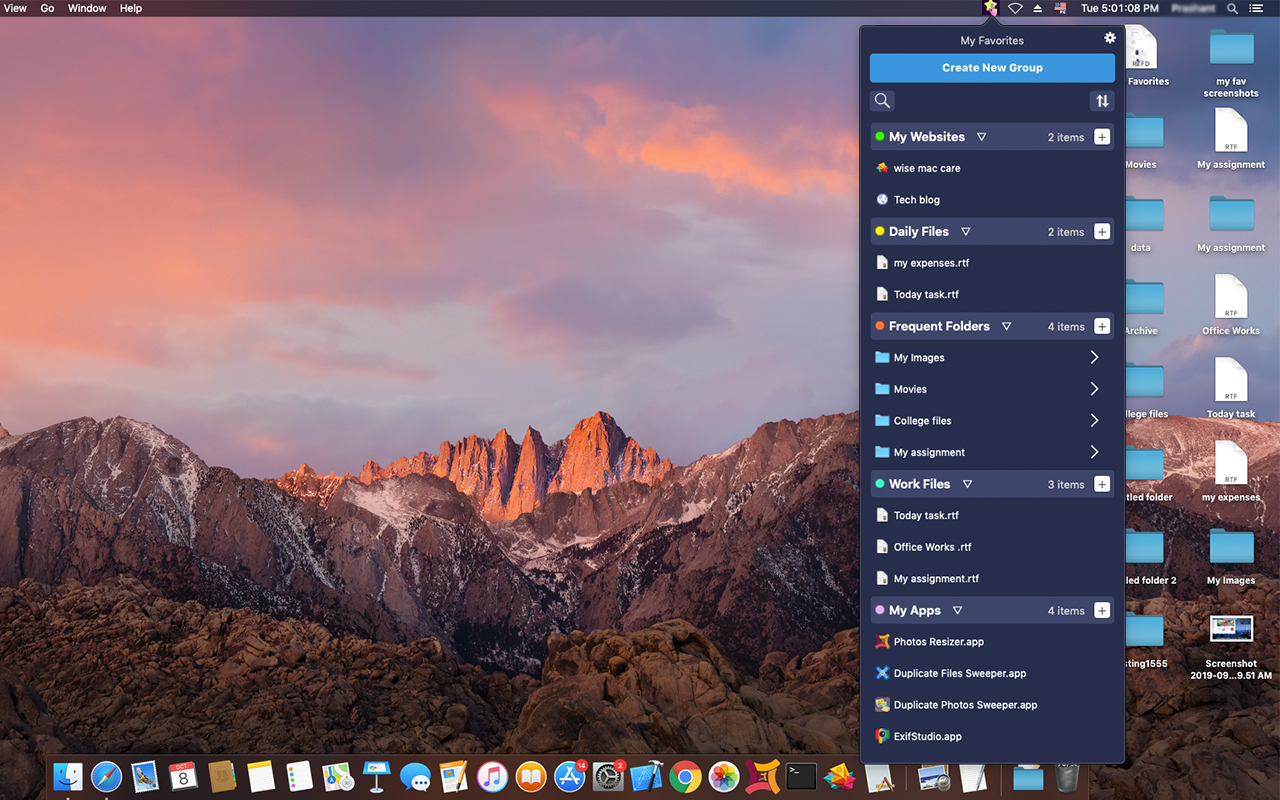
My Favorites
My Favorites is an incredibly handy app that allows you to bookmark your files, folders, web bookmarks, apps, text notes and color swatches that you need ...
Description
My Favorites is an incredibly handy app that allows you to bookmark your files, folders, web bookmarks, apps, text notes and color swatches that you need lightning fast access to.
The best part of the app is that it lives in the top menu-bar of your Desktop and allows you to add-in unlimited number of shortcuts. The shortcuts can be to your frequently accessed files, folders, web URLs and even Applications. You can also add quick text notes and color swatches for the color codes you want to remember and have quick access to.
Whenever you require access to these important files and folders, simply click on the menu-bar icon and select the item from the drop down list that appears.
All the bookmarks that you want to add to have quick access to can be grouped into various Groups. For example: My Apps, Daily Files, Frequent Folders, My Websites, etc. You can give custom names to the Groups and also add color codes for quick visibility and reference. You can also add titles to every book mark you add to for easy reference.
For even more faster access to your favorite items, this drop down list will open with a desired short cut key. To assign a shortcut key you need to go the Settings->Preferences and assign a short key in the available option. Once the key is assigned, you can use that for the drop down list to appear and choose any item to open.
Do not forget to check “Launch My Favorites at System Startup” to have My Favorites launch at System startup.
Benefits and Features of My Favorites :
Optimize Productivity
Save a lot of time by quickly accessing your most used files and folders via “My Favorites” – it’s enormously faster as compared to navigating through Finder.
Drill Down into Favorite Folders
Expand and navigate within your favorite folders via the Shortcut Bar drop down. You no longer need to use Finder to view files within your favorite folders.
Collapse & Expand Groups
Worried for having too many items to access quickly? No problem! You can
Related apps






Screenshots