MathType
MathType is a powerful interactive equation editor that lets you create mathematical notation for word processing, Web pages, desktop publishing,...
Description
MathType is a powerful interactive equation editor that lets you create mathematical notation for word processing, Web pages, desktop publishing, presentations, and for TeX, LaTeX, and MathML documents.
Works with Many Applications and Websites
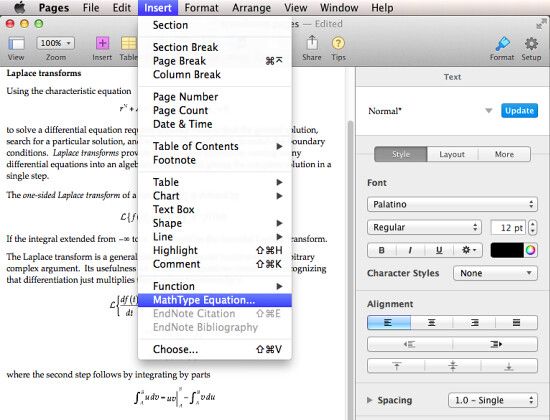
• Apple suite: MathType lets you add equations to documents, presentations, and spreadsheets in Pages, Numbers, and Keynote.
• Microsoft Office 2016 Support: MathType is compatible with Word 2016. It will support PowerPoint 2016 soon.
• Apple iBooks Author: Add and edit equations in the ebooks you are authoring and make the math accessible to people with visual disabilities.
• Many Other Applications and Websites: MathType also works with over 800+ applications and websites, including:
• Yahoo Mail, Gmail, Hotmail, Mac Mail, Microsoft Outlook
• Mathematica, Maple
• InDesign, QuarkXpress
• Blackboard, Moodle, WebAssign
• Wikipedia, Wolfram|Alpha
• Evernote
• Many Ways to Work: MathType can add equations to virtually any application or website into which you can paste or drag a graphic in PDF, EPS, or GIF format or in LaTeX or MathML math languages. Check our Works With section for details on how MathType works with your favorite apps and websites.
More Symbols, Templates, and Fonts
• More Fonts: MathType has hundreds more symbols and templates than Equation Editor. Besides our exclusive Euclid™ math fonts, you can also make use of the 1000s of math symbols in fonts already on your computer, as well as math fonts you can download from the Internet.
• Find Symbols: MathType’s Insert Symbol dialog allows you to explore the available symbols and insert them with a click or keystroke.
Three Ways to Create Equations
• Point-and-Click Editing with Automatic Formatting: Equations can be created quickly by choosing templates from MathType’s palettes and typing into their empty slots. MathType applies mathematical spacing rules automatically as you type.
• Type TeX or LaTeX: If you already know the TeX typesetting language, you
Related apps






Screenshots