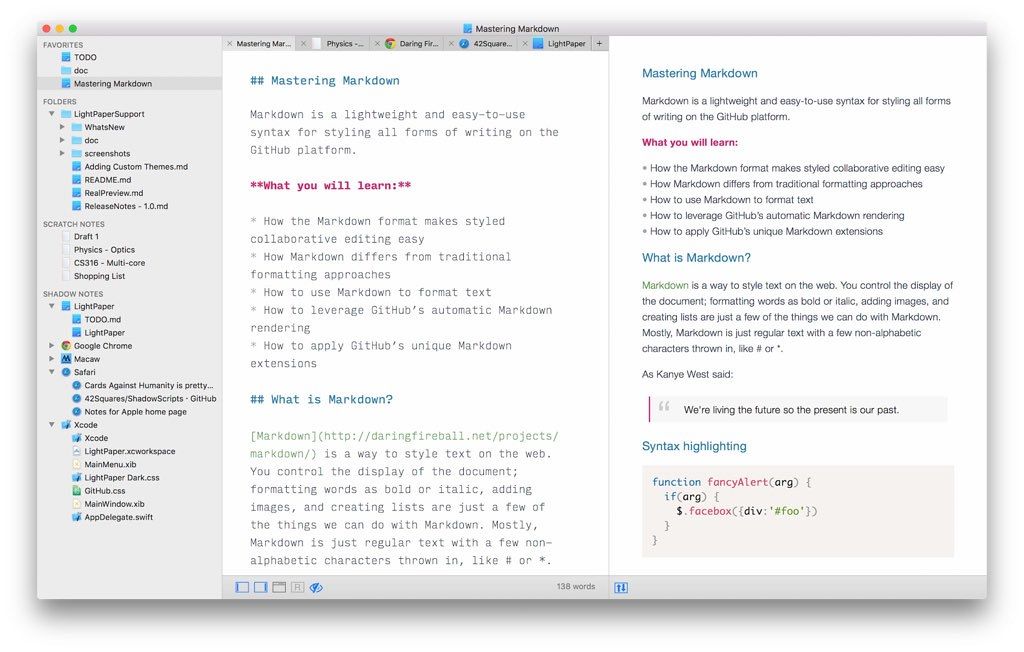
LightPaper
LightPaper 1.4.1 - is a simple, beautiful, powerful, yet free text editor for passionate writers. You can use LightPaper to write any kind of text...
Description
LightPaper is a simple, beautiful, powerful, yet free text editor for passionate writers. You can use LightPaper to write any kind of text documents — blogs, articles, notes, READMEs, TODOs, or the next chapter of your new novel. Its simple interface gets out of your way, allowing you to focus on writing.
To remove distractions, you can switch to Distraction-Free Mode to completely immerse yourself in your current paragraph. It comes bundled with a handful of themes and beautiful fonts. You can also easily create your own themes or add existing ones.
Features
• Built-in folder navigator
• Multi-tabs
• Markdown and MultiMarkdown support
• Live preview
• Built-in and custom styles for both editor and preview
• Distraction-Free Mode
• Quick Open
• PDF/HTML/audio export
• GitHub flavored Code Blocks support
• Math rendering support in output
• Syntax highlighting for code blocks
WHAT’S NEW
Version 1.4.1:
New
• New unsaved files are restored automatically when closing the application without asking you to save first. If you close a tab, however, you’ll be prompted to save it first if it is unsaved.
• Added a new syntax highlighting theme – Solarized.
• One click document open. Save yourself a click as you don’t have to double click to open a document. Single click will temporarily open a document. To permanently open a document, double click like usual.
• One click folder toggle. A single click will expand/ collapse a folder in the navigator.
• LightPaper Mini – added a slider to change the width/height ratio of the mini popover window. This can be accessed from the preferences.
• You can now sort sidebar items (except Folders) using different options. Right-click on one of the Favorites, Scratch Notes, Shadow Notes headers for Sorting Options.
• You can now use shortcuts to jump between editor and the sidebar. See View > Jump to Sidebar and View > Jump to Editor for available shortcuts.
• You can now use Cmd+Enter to open a sidebar item instead of using your mouse
Related apps






Screenshots