FigrCollage
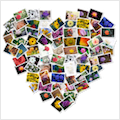
Best software to make a photo collage in the form of any shape, number, word, or text. Use your pictures to make a photo collage in...
Description
Best software to make a photo collage in the form of any shape, number, word, or text. Use your pictures to make a photo collage in heart, circle, square or any other shape. Arrange your photos in the shape of number 1, 2, or any other number. Layout pictures to form any alphabet or word.
SAMPLE USAGE
• Make a collage in the shape of number 1 to celebrate your child’s first birthday.
• Make a “Thank You” or “Happy Birthday” collage by arranging photos to form these words.
• Make a heart shaped collage from your and your partner’s photos as a valentine’s day gift.
FEATURES
• Arrange pictures to form any shape
• Arrange pictures to form any number
• Arrange pictures to form any word or text
• Large number of standard shapes to choose from
• Use your own shapes
• Layout pictures in a freeform photo pile or in a grid of rectangular/hexagonal/circular photos
• Set a background color or use a transparent background
• Select from a wide range of output
size
s
• Specify custom output
size
s
• Landscape or portrait collages
• Export collage as JPEG, PNG, or TIFF to send it to a print shop or to print it from the local printer
• Export collage to Photos app
• Set collage as Desktop Picture
• Share photo collage on Facebook, Twitter, Flickr, Email, and AirDrop
• Save project to edit later
WHAT’S NEW
Version 3.3.7:
• Release notes were unavailable when this listing was updated.
REQUIREMENTS
OS X 10.9 or later, 64-bit processor
ScreenShots
:
If you are using Adblocker!! Please support this website by adding us to your whitelist. Ads are what helps us bring you premium content! Or read this to know how you can support us. Thank you!
Size
– 62.1MB
Previous Versions
Editor-checked details
Recommended for personal, school and small-business birthday numbers, anniversary words, class/graduation, family hearts and event keepsakes. Workflow: select photos for rights and quality; normalise orientation and consolidate sources; derive canvas pixels and shape complexity from viewing distance; choose a simple heavy silhouette/font; keep photo count near or above cell count; generate several cell-style variants; inspect usage/duplication; fix face crops and replace priority cells; review silhouette and individual clarity at 100%; use PNG for transparency and high-quality TIFF/JPEG for print; make a proof; archive project, sources, custom shape, rights, manifest and SHA-256. Compare TurboCollage, Picture Collage Maker or Posterino for other templates; move professional print layout to InDesign/Publisher.
Pros
- Its three-step workflow quickly forms many photos into a recognisable shape, number or text without professional layout skills. Beyond standard shapes, high-contrast custom images can be imported, inverted, moved and scaled. Five cell styles, edge-only/masked placement, freeform piles and grids cover birthday numbers, anniversary words, heart gifts and simple campaign art. It ensures each source appears at least once and reports picture/cell use and duplication, helping fair representation. Individual cells can be cropped/replaced and projects saved for revision. Custom dimensions, landscape/portrait, transparency and JPEG/PNG/TIFF suit screens and ordinary photo printing.
Cons
- It produces a single raster collage, not a layered professional layout; exported photos cannot remain independently and non-destructively editable. Fine silhouettes and long text need many tiny cells, making individual images unreadable at small print size. Mixed aspect ratios are centre-cropped, so faces and subjects need cell-by-cell review. Too few photos causes repetition despite the warning. PNG is required for transparency, while print colour, bleed and effective DPI remain external responsibilities. The 3.3.7 interface is officially English/French/German/Spanish. Native Apple-silicon architecture is not stated, so validate this older build on M-series/later macOS. It does not replace Lightroom culling or InDesign production layout.
Installation steps
- The site package is FigrCollage 3.3.7; the official minimum is macOS 10.11. Unzip FigrCollageForMac.zip and drag the app to Applications. Trial exports carry a watermark; licensed users register via FigrCollage > Register. Copy all sources into a project folder, normalise orientation, and remove duplicates, blur and undersized files. Set final print/screen dimensions and orientation before choosing a shape, number, text or a high-contrast custom-shape image. Match cell count/size to shape complexity and compare Freeform, Rectangle, Circle, Hexagon and Diamond. Inspect every automatic centre crop and replace cells that cut important faces. Read the generated usage/duplication message; add pictures or reduce cells when repetition is excessive. Transparent backgrounds require PNG. For print, export a TIFF/JPEG proof and verify pixels and aspect ratio.
Uninstallation steps
- Before removal, preserve FigrCollage project files, source photos, custom shapes, final JPEG/PNG/TIFF, print proof and licence records. Projects may depend on source paths, so consolidate assets, reopen the project and confirm none are missing; create a manifest and SHA-256. Record canvas size/orientation, shape/text, font, cell style/count, spacing, background, duplication and manual replacements for future reconstruction. Keep both transparent PNG and a viewable backed version. Commercial delivery should retain client permission, model releases and font/logo rights. After independent-open and print-size checks, quit and remove the app. Before clearing preferences, capture settings; projects/outputs must not live only in cache or Photos.
Common errors and fixes
- An unreadable silhouette usually means fine detail, long text or cells that are too large; simplify the shape, enlarge the canvas, add cells and supply more photos. If a custom shape is reversed, use Invert Shape or rebuild a clean, high-contrast, shadow-free black/white JPG/PNG. Faces are cut because differing aspect ratios are centre-cropped; crop/reposition the selected cell or replace it with a matching ratio. Excess repetition is expected when cells outnumber photos—read the generation message, add pictures, reduce cells or replace manually. JPEG cannot retain alpha, so use PNG for transparency. For blurry print, calculate pixels at final physical size rather than trusting preview, and avoid social-media copies. Missing project photos require restoring paths or relinking. If this older build misbehaves on M-series Macs, check Rosetta availability and file permissions.
What changed in this version
- FigrCollage 3.3.7 is the Mac build currently offered by the developer, but no verifiable itemised 3.3.7 changelog is published, so specific fixes are not inferred. Confirmed workflows include shape, number, letter/text and custom picture shapes; moving/scaling the shape; Freeform, rectangular, circular, hexagonal and diamond cells; default, edges-only and Shape Masked placement; per-cell cropping; ensuring every input appears at least once while reporting duplication; custom output dimensions, transparent background and JPEG/PNG/TIFF export. This summary is confined to capabilities present by 3.3.7.






Alternatives
Screenshots
