Farrago
Farrago provides the best way to quickly play sound bites, audio effects, and music clips on your Mac. Podcasters can use Farrago to...
- Intel, 64-bit processor
- macOS 14.0 or later
Description
Farrago provides the best way to quickly play sound bites, audio effects, and music clips on your Mac. Podcasters can use Farrago to include musical accompaniment and sound effects during recording sessions, while theater techs can run the audio for live shows. Whether it’s providing quick access to a large library of sounds or running through a defined list of audio, Farrago is ready to assist!
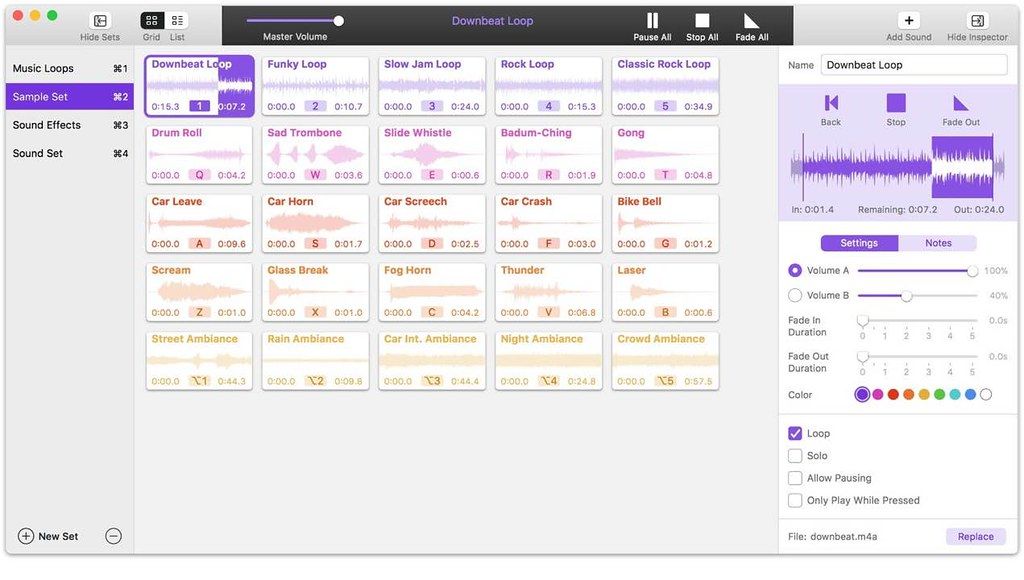
• Powerful Tile Interface: Farrago’s tile grid lets you lay out your audio exactly how you want it. Put your sounds at your fingertips and work the way you want.
• Customize With the Inspector: Use the inspector to tailor each sound’s settings to your needs. Set the tile name and color, tweak in/out points, alter fade settings and more.
• Organize With Sets: Create distinct groups of audio based on mood, show, or any other critera you like. Using sets makes managing audio a breeze.
• Sound Sets: Farrago’s default sound set is useful, but you can create your own sets based on show, mood, or anything else you like.
• A Thoughtful Interface: Farrago’s tile-based layout provides an easily understood way to play your audio via the keyboard or mouse.
• Global Access via Hotkeys: With Farrago’s user-definable Global Hotkey, you can pull the app forward, then use the in-app shortcuts to instantly trigger your desired audio.
WHAT’S NEW
Version 2.2.0:
Support for MacOS 27 (Golden Gate)
• Farrago no longer warns on launch when run on MacOS 27 (Golden Gate). There are no known issues on Golden Gate at present.
Substantial Enhancements to Shortcuts
Farrago’s Shortcuts support has been greatly enhanced :
• A new “Play Sound Set” shortcut has been added. It begins playback on the first un-played sound in the selected sound set, which is particularly useful for sets in List mode
• The new “Configure Sound Set” shortcut allows a user to configure many variables for a sound set. Adjustments can be made to the set’s name, notes, display mode, playback mode, crossfade duration, and loc






Screenshots