EdgeView
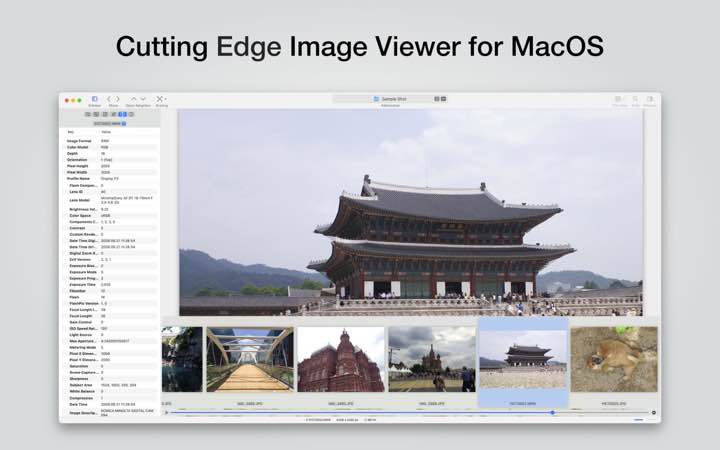
EdgeView is fast image viewer has elegant user interfaceEdgeView is developed and designed for modern MacOS.It can open various ...
- Intel, 64-bit processor
- macOS 11.5 or later
Description
EdgeView is fast image viewer has elegant user interface
EdgeView is developed and designed for modern MacOS.
It can open various image files such as JPEG, PNG, TIFF, BMP, and RAW file of DSLR, EPS and PDF, AI(Adobe Illustrator). Can open image files in archive directly without extraction.
User can open files, rename files, delete files from EdgeView’s file browser. Also can access to SMB/AFP/FTP network volume.
User can navigate images quickly by using keyboard shorcut, mouse wheel, trackpad gesture. EdgeVew show EXIF information, play animation GIF/PNG/WebP smoothly. Save last status to history, and restore when reopen file.
EdgeView will be the best choice when viewing and managing image files.
Features
• Rewrote full code as Swift for improve performance.
• Support m1 CPU Mac.
• Has easy UI, can control main function at Sidebar.
• Support English/Korean/Japanese/Chinese(Simplified).
Image Viewer
• Supporting image files such as JPG, GIF, BMP, PSD, TIFF, RAW, WEBP and PDF, EPS, AI(Adobe Illustrator), OpenEXR, HDR, TGA.
• Can play animation GIF/PNG/WebP. User can control animation with floating animation controller.
• Dispaly internal image(or frame) of animation GIF/PNG/WebP or HEIC that has multiple internal image.
• Can read and show images of major archive formats (such as ZIP, RAR, CBZ, CBR, 7-zip) without extraction. Of course, can open ZIP file that 4GB over.
• Can read encrypted archive file.
• Can read archive file in archive file recursively
• Improved draw speed by rebuilt image cache system and drawing engine.
• Draw images as high quality.
• Provide suitable functions for comic reading such as ‘Two-Page Spread’, ‘Continuous Scroll mode’, ‘Right to Left’, etc.
• Provide multiple navigation functions like as ‘Move’, ‘Skip’, ‘Shift’, etc.
• User can navigate images and check whole thumbnails at Thumbnailsbar.
• User can navigate images by using keyboard shortcut, mouse wheel, trackpad gesture.
• Can rotate and flip images. Orientation will
Editor-checked details
Recommended for local comics, archived albums, design-asset preview and NAS image libraries. Use: read-only master library; isolate/scan unknown archives; verify CRC; configure direction/cover/spreads; start with default cache; sample 100% detail and colour; export ratings to a manifest; rename/delete only working copies; archive originals with SHA-256. Prefer CBZ/ZIP and natural filenames for comics, and retain an unencrypted open copy for long-term cross-device use. Compare qView or Pixea for lightweight viewing, XnView MP for cross-platform batch metadata, YACReader/Simple Comic for comic libraries, and Acorn for editing. Use a read-only SMB account for network libraries and avoid FTP for sensitive images.
Pros
- Its strongest advantage is browsing comic books, albums and nested archives without extraction while combining image viewing, file browsing, network volumes and Quick Look. Two-page/single-cover pairing, right-to-left, continuous scroll, thumbnails, shortcuts/wheel/trackpad and saved position suit comics. RAW, PSD, PDF/AI, OpenEXR/HDR, AVIF/JPEG-XL, animation and multi-image containers plus EXIF, histogram, loupe and high-quality caching support fast photo triage. Apple silicon and Intel support, search, ratings, rename, ZIP creation and SMB/AFP/FTP reduce switching among Finder, archive and viewer tools.
Cons
- It is a viewer and light file manager, not a RAW developer, pixel editor, colour proofer, DAM or reliable backup; ratings, rotation and history must not be the sole metadata. Encrypted, nested and huge archives are convenient but corrupt files, archive bombs and malicious payloads can consume CPU, memory and disk, so isolate and scan unknown sources. Built-in rename/delete and optional deletion warnings increase accidental-loss risk; use read-only network accounts. Excessive cache and high-quality tile settings consume memory. AI/PDF/RAW previews may differ from authoring apps, and EPS is unavailable on macOS 14+. AFP is legacy and FTP is unencrypted by default, so prefer SMB or secure transfer.
Installation steps
- EdgeView 5.9.3 requires macOS 11.5 or later and supports Apple silicon and 64-bit Intel Macs. Grant only the folders, external volumes or network locations needed, not an entire disk by default. Test copies of JPG/PNG, RAW, PDF/AI, multi-image HEIC, animated GIF/WebP, and ZIP/RAR/7z/CBZ/CBR. For comics, configure reading direction, cover/spread pairing, continuous scroll, retained zoom and prefetch cache; for photo review, verify EXIF, colour, histogram, 100% detail and saved orientation. Test SMB/AFP/FTP with a read-only account and check disconnect/reconnect, Unicode names and large archives. More cache entries and smaller high-quality tiles consume more memory, so start with defaults on 8–16 GB systems. On macOS 14 or later, do not depend on EPS viewing; keep PDF/SVG/PNG delivery copies.
Uninstallation steps
- Before removal, record favourites, network locations, shortcuts, reading direction, spread rules, zoom, cache, sorting/rating and history settings. EdgeView history, orientation and ratings are not substitutes for source metadata or a DAM; export important ratings to a separate manifest and retain originals with SHA-256. For nested or encrypted archives, preserve passwords/recovery tools and sample extraction plus CRC with another utility; successful preview does not prove archive integrity. Record server paths and account purpose before removing SMB/AFP/FTP credentials from Keychain, never plaintext passwords. Re-enable deletion warnings if disabled, inspect Trash, and back up support data before removing the app, Quick Look state and caches.
Common errors and fixes
- Slow archives or memory spikes: reduce Image Cache Count, restore default tile size, avoid several large nested archives, and verify CRC with an archive utility. A soft image that sharpens is the normal-to-high-quality cache transition; choose normal-only to avoid flicker or high-only for quality at slower load. For inaccessible external/network volumes, re-authorise the specific volume and check SMB/AFP/FTP host, port, read permissions and credentials—do not repeatedly grant full disk access. Wrong comic pairing requires checking right-to-left, single cover, landscape detection and natural filename sorting. RAW/AI/PDF previews are not authoritative editor renderings; verify deliverables in their native app and standard PDF/PNG. EPS is unavailable on macOS 14+. For animated WebP/GIF stutter, reduce cache and verify in a browser. If Quick Look thumbnails fail, confirm the extension, restart Finder and clear the affected preview cache.
What changed in this version
- The site channel carries EdgeView 5.9.3. Developer documentation confirms this Swift-rewritten generation supports Apple silicon, a rebuilt image cache/drawing engine, high-quality tiled rendering, animated GIF/PNG/WebP, multi-image HEIC, JPEG-XL/AVIF/OpenEXR/HDR/RAW/PDF/AI, and direct viewing of ZIP/RAR/7z/CBZ/CBR including encrypted and nested archives. It also provides two-page and continuous/right-to-left reading, thumbnails, EXIF, histogram, history, ratings, search, SMB/AFP/FTP, compression/extraction and Quick Look. No separate itemised change list accompanies this channel build, so established capabilities are not mislabelled as new; regression-check archives, network volumes, animation, history and Quick Look after updating.






Alternatives


Screenshots