Disk Doctor Pro
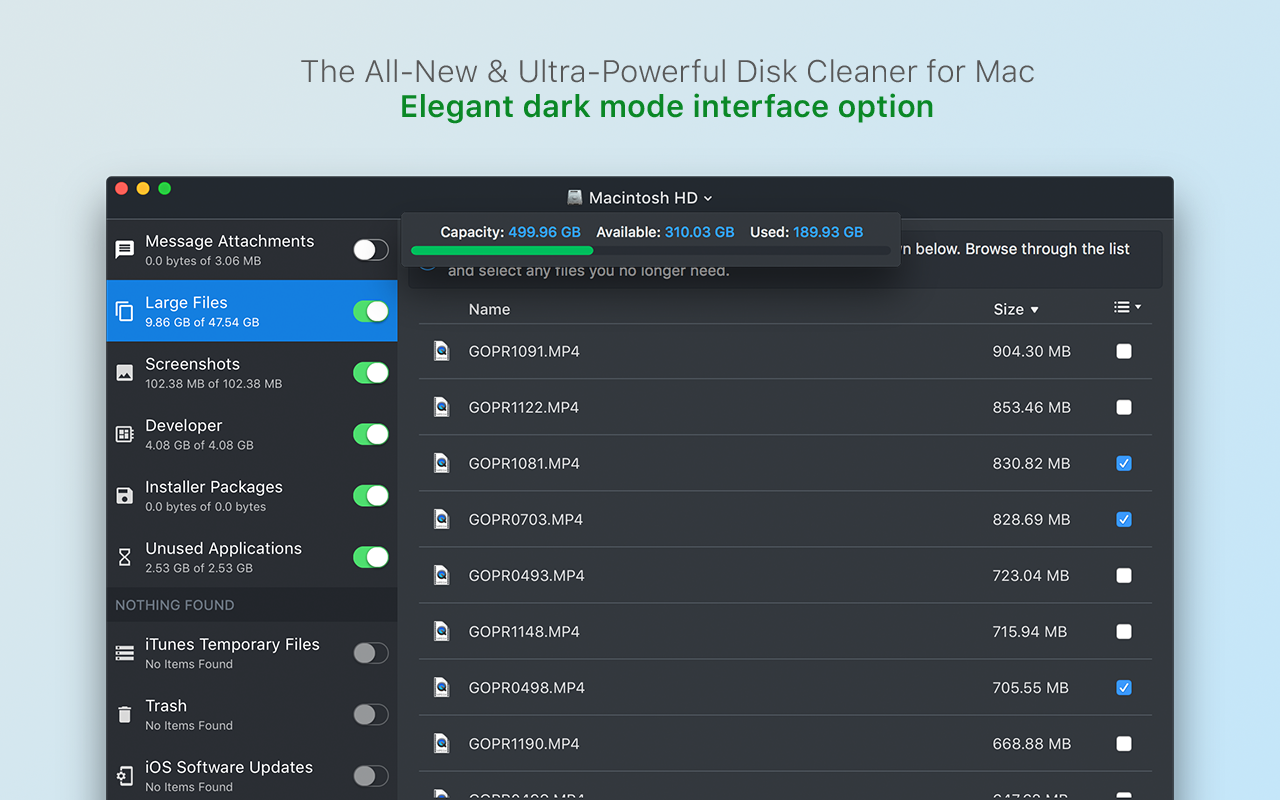
Disk Doctor Pro is our all-new and ultra-powerful disk cleaning app that is capable of removing gigabytes of unneeded ...
- Intel, 64-bit processor
- macOS 11.5 or later
Description
Disk Doctor Pro is our all-new and ultra-powerful disk cleaning app that is capable of removing gigabytes of unneeded files from your Mac within just a few minutes.
The app automatically scans your Mac’s hard drive and quickly displays a huge range of files that can be safely removed to free up valuable disk space and improve system performance.
Disk Doctor Pro scans the following areas:
Application Caches
Caches are used to speed up your apps. However, some apps do not delete their caches after they are no longer needed. This can lead to wasted disk space.
Applications Logs
Some applications automatically create log files that may become quite large. Removing these is an easy way to free up disk space when you are running low.
Application Leftovers
Uninstalled applications sometimes do not fully remove all their associated files. You can free up disk space by removing these unnecessary files.
Browser Caches
Your web browser stores content from web pages on your hard drive. These caches can make websites faster, but often caches become filled with outdated files.
iTunes Temporary Files
Using iTunes to manage and update your iOS devices can often generate lots of temporary caches and files. These can be removed to free up disk space.
Unused Applications
Unused applications provides a list of apps that have not been used in over 90 days. Use this section to identify and remove apps that you no longer need.
iOS Software Updates
You can safely delete old iOS software updates that you no longer need to reduce your disk space usage.
iOS Backups
Removing old iPhone and iPad backups is often a quick way to free up a huge amount of disk space.
Partial Downloads
Partial downloads can be identified and removed as they are files that have not been successfully downloaded due to either being paused or cancelled.
Downloads
Your downloads folder can become very large as it is the default location where files are saved to. Our app can help you to identify fi






Screenshots