Deep Freeze
Deep Freeze has changed the way IT Professionals approach end-point security; its non-restrictive concept offers the most robust Mac protection...
Description
Deep Freeze Mac has changed the way IT Professionals approach end-point security; its non-restrictive concept offers the most robust Mac protection available. The need for IT professionals to perform rebuilds, re-image, or troubleshoot computers is eliminated with Deep Freeze Mac ARD reboot-to-restore technology.
The result is a dramatic reduction in support and IT expenditures and a substantial increase in computer uptime. This edition of Deep Freeze Mac can be deployed and controlled with Apple Remote Desktop (ARD).
Protection and Security:
• Guarantees 100% workstation recovery on restart
• Provides password protection and complete security
• Protects multiple hard drives and partitions
Configuration Options:
• Customize user name and password
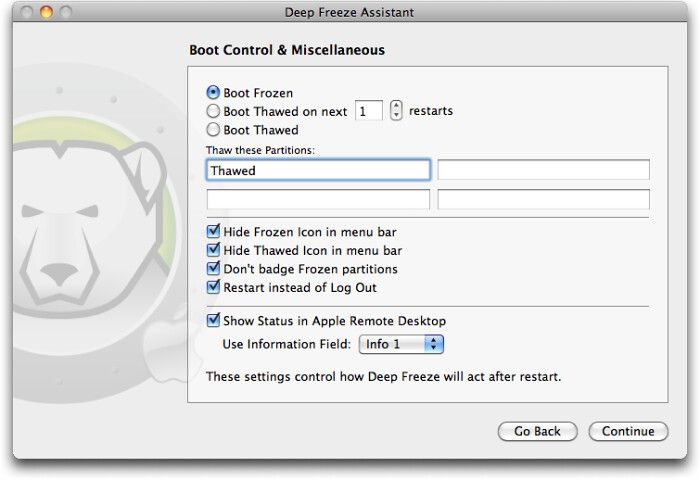
• Choose whether the Deep Freeze icon will appear in the menu bar
• Choose whether the hard drive icon will appear with the Deep Freeze badge
Control and Flexibility:
• Freeze administrator accounts or root account
• Selectively Freeze or Thaw fixed drives, volumes, or partitions
• Import or export configuration information files to or from other Deep Freeze Controllers for deployment
• Use Deep Freeze Assistant to create customized installation packages
Integration and Compatibility:
• Integrates with Apple Remote Desktop (ARD) 2 or 3 for enterprise style capability
• Use Deep Freeze Assistant to install specific Saved Tasks into the ARD console
• Use Saved Tasks related to Deep Freeze for use with ARD, such as Boot Frozen, Boot Thawed, Uninstall Deep Freeze, and others
• Localized in English, French, Spanish, German, Russian, and Japanese
WHAT’S NEW
Version 7.20.220.0107:
New Features :
• Support for macOS Catalina 10.15
• ARD Info Field
• Users can select matching Computer Info Field (1–4) to display the Deep Freeze global status in Apple Remote Desktop.
• Restart on log out
• When enabled, the computer will restart when the user logs out (or when the last user logs out if Fast user switching is enabled).






Screenshots