CompareMerge
CompareMerge is a software tool for file comparison and merging text-like files.It is useful for determining what has changed between versions, and then ...
Description
CompareMerge is a software tool for file comparison and merging text-like files.
It is useful for determining what has changed between versions, and then merging changes between versions.
Functions of the application :
• SUPPORT MULTI-LANGUAGES:
• English
• Deutsch
• Français
• 日本語
• 한국어
• Español
• Português
• Čeština
• Dansk
• Suomi
• Italiano
• Nederlands
• Norsk
• Polski
• Русский
• Svenska
• ไทย
• Türkçe
• Tiếng Việt
• 中文(中国)
• 中文(台灣)
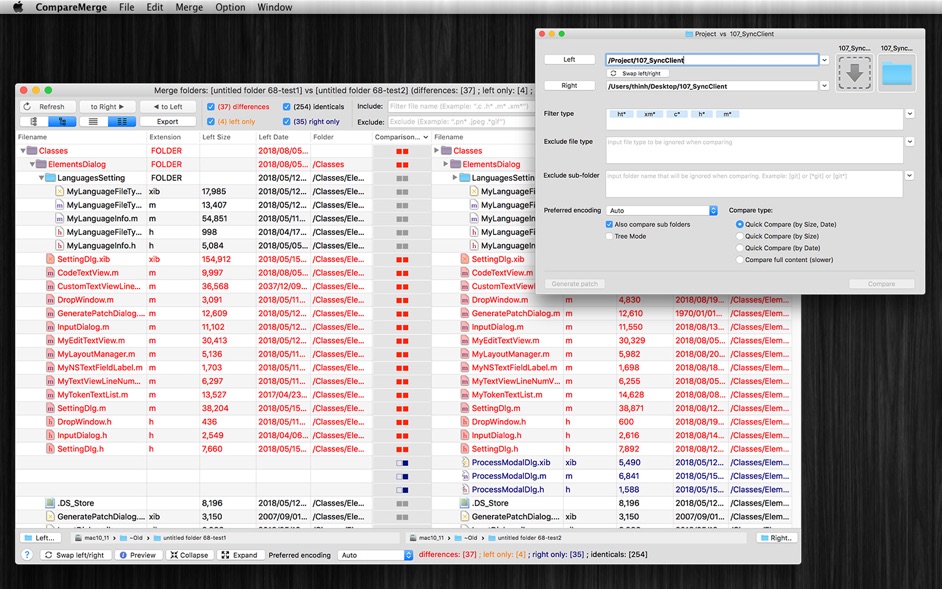
• COMPARE FOLDERS/FILES: can compare both 2 files or 2 folders
• QUICK COMPARE FOLDERS: allow to quickly compare two folders’ files by
size
or date or both or with full content (slower)
• BLANK COMPARE: Allow to create blank edit window to compare text then save later
• CUSTOM THEME COLOR: User can select predefined theme color or customize edit text color, background color….
• INLINE EDIT (Edit/Merge at the same time) : Compare and Merge 2 text files: allow you to edit/compare/merge 2 text files in the same windows
• LINE NUMBER: When edit file, showing line number will make it easier to know exactly changes positions.
• GENERATE PATCH: the application also contains patch generating capabilities.
• FILE FILTERS: Include or exclude files that match regular expressions. Other than that, after compare 2 folders, you could filter display item base on file name.
• INCLUDE SUBFOLDERS: This option lets you control the depth of a folder comparison. Enabling it compares all folder levels
• COPY TO: after compare 2 folder, you can select left or right files to copy to different location (example: when release change source)
• DELETE Left/Right/Both: after compare 2 folder, you can select left or right files to delete
• IGNORE CASE, SPACE: Allow to ignore Case, Space in Edit/Merge window
• IGNORE End-Line code: Allow to ignore difference in End Line Code (LF for Mac·Unix file, CR-LF for Windows file, or CR for Mac classic file) in Edit mode.
• Note: when compare folders, EOL was not ignored.
• EXPORT / CREATE REPORT: Allow to export c






Screenshots