ColoFolXS
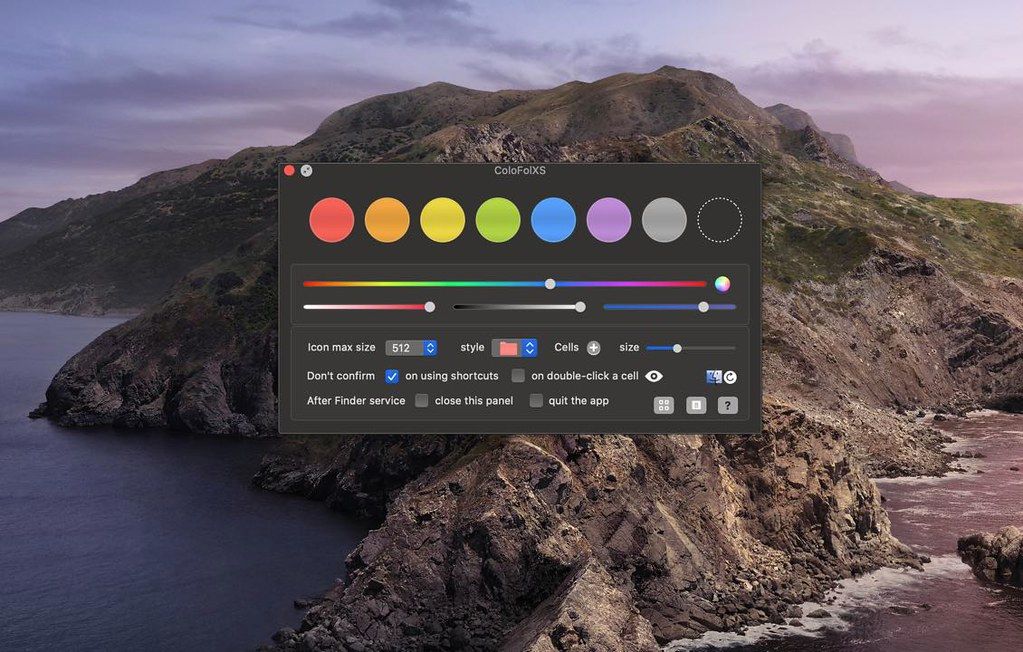
ColoFolXS is a compact icon tool specialized in coloring folders. Just drop one or more folders to a color cell on the main panel.Or use...
Description
ColoFolXS is a compact icon tool specialized in coloring folders. Just drop one or more folders to a color cell on the main panel.
Or use the app as a Finder :
• right-click (ctrl-click) a folder in the Finder.
• select “ColoFolXS” (or use a shortcut assigned in the Finder Services Preferences).
• click a color cell on the ColoFolXS main panel.
Main Features
• The color cells are editable: change color, add, remove and reorder.
• You can also set icons in the cells to attach them as they are.
• If Finder tags are linked to the cells in the Setting, they are added or removed together when you use ColoFolXS.
• Shortcuts are assignable to the removal function and each ColoFolXS cell.
WHAT’S NEW
Version 2.2.2:
• Release notes were unavailable when this listing was updated.
REQUIREMENTS
• Intel, 64-bit processor
• macOS 10.15 or later
ScreenShots
If you are using Adblocker!! Please support this website by adding us to your whitelist. Ads are what helps us bring you premium content! Or read this to know how you can support us. Thank you!
Size
– 14.2MB
Previous Versions






Screenshots