Clicker for Netflix
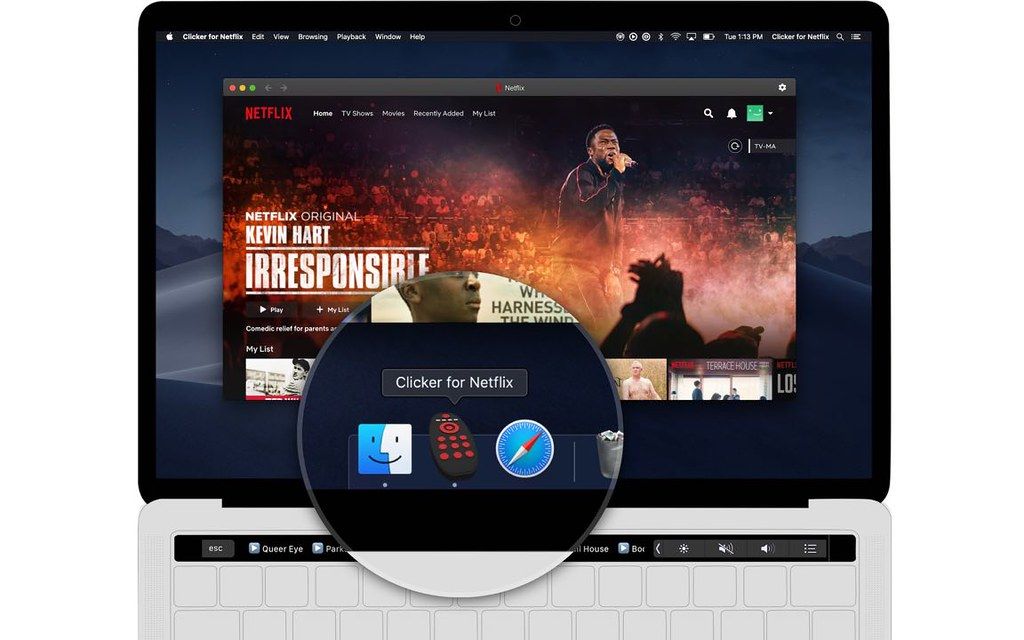
No more switching between browser tabs. Simply launch Clicker for Netflix straight from your dock and get your binge on.Plus, with InstantStart technology...
Description
No more switching between browser tabs. Simply launch Clicker for Netflix straight from your dock and get your binge on.
Plus, with InstantStart technology, you will pick up right where you left off the last time you were watching. Hunting to find your show again is so early 2000s.
Features
• Launch Netflix right from your Dock
• Control Netflix from the Touch Bar
• Picture-in-Picture support
• Quick Resume Dropdown
• Prevent trailers from auto-playing
• Truly full screen browsing
• Auto-resume last played video
• Auto-skip video intro
• Auto-advance to next episode
• No more crazy hover effects on posters
• Hide “Who’s Watching?” popup
• Remove ‘Netflix Originals’ row
Multitasking extraordinare
With Picture-in-Picture support built right in, watch your favorite show while you fly through those TPS reports.
Just don’t let your boss catch you!
Touch Bar Controls
Can’t find that show you were just watching?
Simply scroll through a list of your recently watched shows on the Touch Bar, tap on the name of the show you want to watch, and boom! You’re right back into your show.
Quick Resume Dropdown from the Menu Bar
Instant access to your recently watched shows no matter where you are on your Mac
Prevent a different show from autoplaying
Want to watch all the new Rick and Morty episodes on autoplay, but don’t want to be dumped into another random show after you finish?
Simply check a box, and voila! It’s that easy with Clicker for Netflix.
Dark mode that follows your Mac settings
Dark mode in Clicker for Netflix will automatically switch to your system-wide Mac preferences. Stop having to dig around for the settings every time you want to change.
Truly full screen browsing
Show your love by making all that unnecessary chrome (pun intended) fade away with Netflix in its full glory.
Customize to your liking
Just check a box, and autoplay no more! It’s that simple.
More customizations:
• Prevent “Who’s Watching” screen on startup
• Prevent h
Related apps






Screenshots