Aiseesoft HEIC Converter
HEIC is the image format since Apple's new iOS 13. This photo format saves much space without compressing image quality...
- Intel, 64-bit processor
- OS X 10.7 or later
Description
HEIC is the image format since Apple’s new iOS 13. This photo format saves much space without compressing image quality. It is considered as the replacement of JPEG image format. However, HEIC has some disadvantages. HEIC photos cannot be opened and viewed on outdated versions of the iOS or many other platforms. But image format like JPG or PNG are much more compatible.
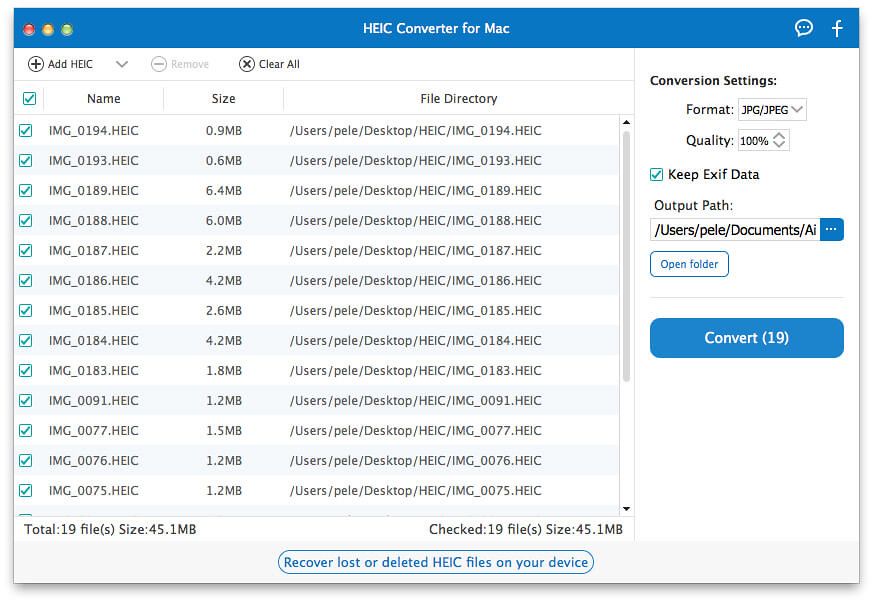
Aiseesoft HEIC Converter is here for you to solve compatibility problems. With this powerful HEIC converting tool, you can convert all your HEIF (.heic) photos to JPG/JPEG or to PNG on Windows or Mac computer without any hassle.
In iOS 11, Apple announces the HEIF(.HEIC) format to be replacing the JPEG image format. So What is HEIC and how is this new image format?
HEIC is the image format named by Apple for the new HEIF standard. And HEIF stands for High Efficiency Image Format. As its name implies, HEIC format is a more streamlined way for storing image items. It adopts more advanced and modern compression, allowing digital photographs taken by iPhone, iPad or iPod running iOS 11 to be created in smaller file
size
s, while keeping higher image quality.
JPG is a file type developed by JPEG, also referring to the Joint Photographic Experts Group. It is a standard for professional photographers. JPG images compress image data by reducing sections of images. Due to the lossy nature of JPG, this image format cannot be an ideal way to store digital photographs or other art files.
PNG stands for Portable Network Graphics. It was developed as an alternative to GIF. PNG is an great file type for internet graphics, as it supports a large number of colors like PNG-8 (256 colors) and PNG-24 (about 16.7 million colors).
What Can HEIC Converter Do for You
This high efficiency image format enables you to create and store photos in much smaller
size
s without sacrificing image quality. But one problem persists as multiple users cannot conveniently open and view HEIC images. With Aiseesoft HEIC Converter,






Screenshots